Instead of defining each aggregation type and group by columns separately, you can call this function and enter the simplified aggregation syntax separated using BY.
data_grid_id.Saggregate("aggregation_type_prefix.column_name BY group_by_field",true,false);
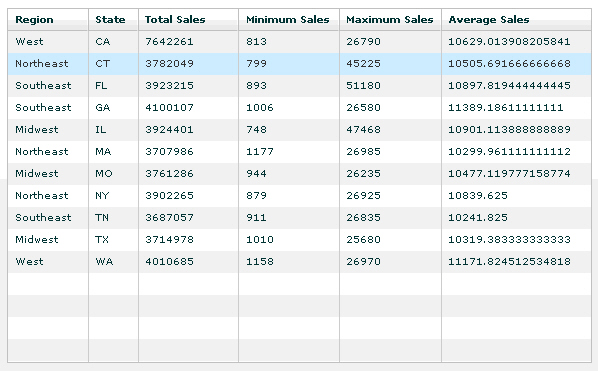
The following example illustrates how to use Saggregate function to create an aggregated DataGrid when creating applications using WebFOCUS Enable API.
<?xml version="1.0" encoding="utf-8"?>
<mx:Application xmlns:mx="http://www.adobe.com/2006/mxml" layout="absolute" creationComplete="initApp()" backgroundColor="#ffffff">
 <mx:Script>
  <![CDATA[
  import mx.charts.HitData;
  import mx.controls.Alert;
  import mx.collections.ArrayCollection;
  public var grid1:ibiObject = new ibiObject();
  public var fex:String = "http://localhost:8080/ibi_apps/WFServlet?IBIF_ex=ggsales&IBIAPP_app=ibiflexdemo";
  public function initApp():void
  {
    grid1.init(fex,dataReady);
  }
  public function dataReady(grid:ibiObject,obj:*):void
  {
grid1.populateGrid(false);
load_main1agg();
}
public function load_main1agg():void
{
grid1.Saggregate("Sum.DOLLARS,Average.DOLLARS,Min.DOLLARS,Max.DOLLARS BY ST,REGION",true,false);
main1agg.dataProvider = grid1.prGridagg;
}
]]>
</mx:Script>
<mx:DataGrid x="30" y="30" width="585" id="main1agg" height="355">
<mx:columns>
<mx:DataGridColumn id="col1" headerText="Region" dataField="REGION" width="80"/>
<mx:DataGridColumn id="col2" headerText="State" dataField="ST" width="50"/>
<mx:DataGridColumn id="col3" headerText="Total Sales" dataField="Sum.DOLLARS"/>
<mx:DataGridColumn id="col4" headerText="Minimum Sales" dataField="Min.DOLLARS"/>
<mx:DataGridColumn id="col5" headerText="Maximum Sales" dataField="Max.DOLLARS"/>
<mx:DataGridColumn id="col6" headerText="Average Sales" dataField="Average.DOLLARS" width="150"/>
</mx:columns>
</mx:DataGrid>
</mx:Application> The expected output is as follows.
| WebFOCUS |