Format Display Options for Abbreviating Numeric Values
Numeric values can be displayed in abbreviated form in terms of thousands, millions, billions, or trillions, using the format options k, m, b, t, and a.
- Format option k displays numeric values in terms of thousands. For example, 12345 displays as 12.35K.
- Format option m displays numeric values in terms of millions. For example, 1234567 displays as 1.23M.
- Format option b displays numeric values in terms of billions. For example, 1234567890 displays as 1.23B.
- Format option t displays numeric values in terms of trillions. For example, 1234567890000 displays as 1.23T.
- Format option a calculates the appropriate abbreviated option to use depending on the magnitude of the number, and uses that option for display. This option uses the appropriate abbreviation for the specific value on the current row and, therefore, each row may have a different abbreviation. For example, 1234567890 displays as 1.23B, while 1234567890000 displays as 1.23T.
Note:
- The abbreviated value displays with the number of decimal places specified in the format of the field to which is it returned.
- The format options do not change how a value is stored, just how it is displayed.
- Numbers are rounded prior to display in an abbreviated format. Therefore, when a packed or integer formatted number is displayed in abbreviated form using the EXTENDNUM ON setting, overflow values can be mistaken for correct results.
- These display options are supported with all numeric formats and are compatible with additional display options such as -, B, R, C, c, M, and N.
Example: Using Display Options for Abbreviating Numeric Values
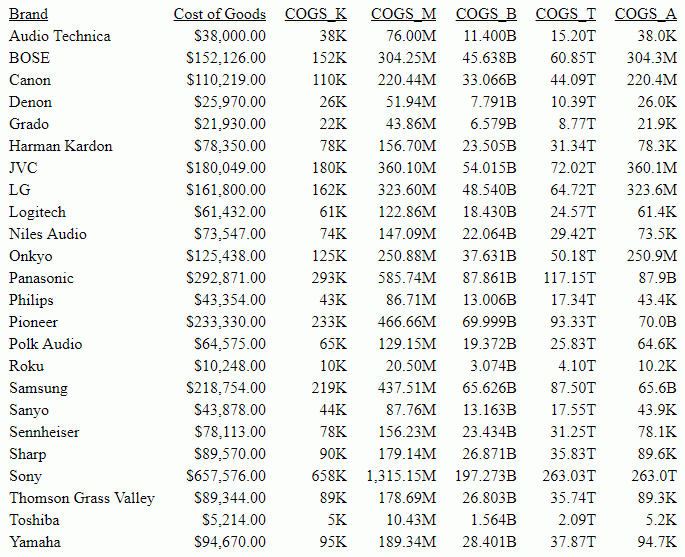
The following request computes numeric fields that use the display options k, m, b, t, and a.
TABLE FILE WFLITE
SUM COGS_US
COMPUTE
COGS_K/I10k = COGS_US;
COGS_M/D20.2m = COGS_US *2000;
COGS_B/D20.3b = COGS_US *300000;
COGS_T/D20.2t = COGS_US *400000000;
COGS_A/D20.1a = IF COGS_US LT 100000 THEN COGS_US
                ELSE IF COGS_US LT 200000 THEN COGS_US *2000
                ELSE IF COGS_US LT 500000 THEN COGS_US *300000
                ELSE COGS_US *400000000;
BY BRAND
ON TABLE SET PAGE NOLEAD
ON TABLE SET STYLE *
GRID=OFF,$
ENDSTYLE
END
The output is shown in the following image. COGS_K has format I, which displays with no decimal places. COGS_M, COGS_B, and COGS_T have format D20.2, which displays with two decimal places. COGS_A has format D20.1, which displays with one decimal place.